
ClubSphere
YEAR
2025
TIMELINE
3 weeks
TOOLS
Figma
PLATFORM
Web
INDUSTRY
Sports
TEAM
Self-initiated
ClubSphere is a self-initiated product design case study for local youth soccer organizations that need a clearer way to manage club operations. I designed a centralized web platform that brings scouting, coaching, medical tracking, academy development, and performance analytics into one shared workspace.
My role covered research planning, stakeholder interviews, workflow mapping, information architecture, wireframes, high-fidelity UI design, and prototype walkthroughs.
The project was grounded in the Greater Central Florida Youth Soccer League (GCFYSL), an FYSA-affiliated league serving approximately 40 clubs and 400 teams each season. To protect player and staff privacy, all identifiable names in this case study have been replaced with fictional ones.
Designing clarity for clubs operating in chaos
SUMMARY
THE PROBLEM
Why fragmented tools were holding clubs back, and what they really needed
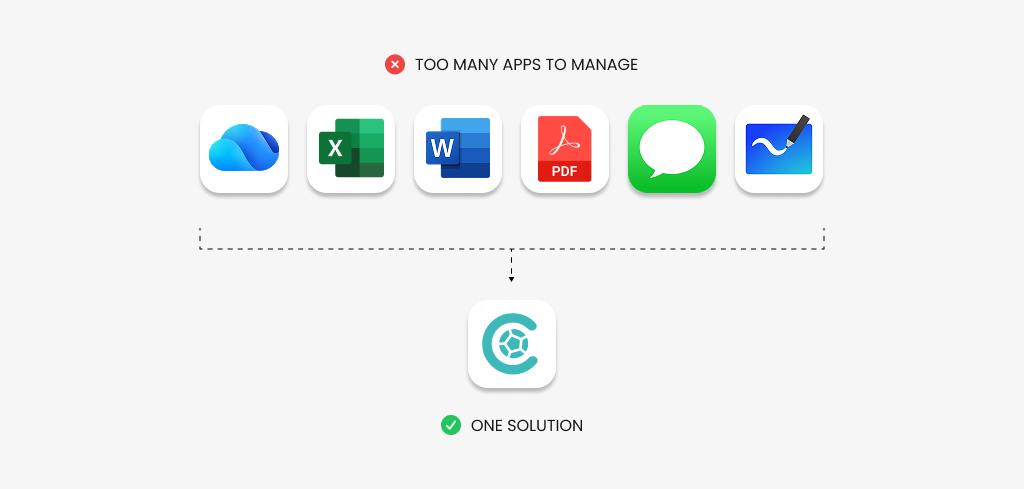
Local youth soccer clubs often rely on disconnected tools, including PDFs, Word documents, spreadsheets, messaging apps, and whiteboards, to manage daily operations. As information moves between scouts, coaches, medical staff, and administrators, context gets lost and decisions are often made without a complete picture of player availability or readiness.
The goal was to centralize player and club data while supporting multiple roles without overwhelming users, making scouting, availability, performance tracking, and risk easier to understand at a glance.
RESEARCH
I spoke with two people involved in day-to-day soccer operations to ground the design in realistic needs. These conversations helped clarify where workflows overlap or diverge, what information each role needs most urgently, and how the product could support different users without forcing everyone into the same experience.
Different roles, competing needs
Miguel Gutierrez | Player Scout
He evaluates local matches and tournaments and needs a fast, reliable way to capture and share player insights without slowing down his workflow.
😣 PAIN POINTS
• Easy to fumble the different apps
• Limited time between matches to report
• No easy way to compare past evaluations
• Reduce time spent rewriting the same notes
🎯 GOALS & NEEDS
• Quickly record during matches
• Keep track of players he’s scouted
• Share clear, consistent reports with staff
• Reduce time spent rewriting the same notes
😡 FRUSTRATIONS
• Important details get lost on their devices
• Duplicate scouting when no central system
• Hard to see how evaluations influence prospects
💪🏼 MOTIVATIONS
• Help the club make smarter, informed decisions
• Build trust with coaches through clear insights
• Stay organized while covering local matches
• Focus more on observing players and less on admin
Steve Collins | Head Coach
He manages training and match preparation and relies on clear, up-to-date information about player availability, fitness, and readiness to make confident decisions.
😣 PAIN POINTS
• Player updates come from disconnected sources
• Medical/training data is often inconsistent
• Scouting insights are buried in emails
• Lineup decisions rely too heavily on memory
🎯 GOALS & NEEDS
• Quickly understand player availability
• Prepare lineups with ease using latest reports
• Reduce last-minute surprises related to injuries
• Communicate clear decisions
😡 FRUSTRATIONS
• Learning about injuries too late in the week
• Repeatedly asking staff for the same information
• Switching between spreadsheets and messages
• Losing time between these tasks
💪🏼 MOTIVATIONS
• Field strongest squad every match
• Minimize injury risk and player burnout
• Build trust with players through transparent decisions
• Spend more time coaching and less chasing information
As matchday approaches, Miguel and Steve work through a set of critical pre-match tasks to ensure players, staff, and logistics are fully prepared before kickoff. These journeys highlight the most critical workflows where clarity and speed matter most in day-to-day club operations.
It’s match week, lots to do
Steve Collins
Review Squad Status
Actions
- 1Opens team spread sheet
- 2Checks players availability
- 3Check injury updates from medical staff
Thinking
"I need to see who's fit and ready for this weekend. Hopefully no new injuries."
Feeling
Touchpoints
⚠ Pain Points
- Previously required checking 3 different sources
★ Opportunities
- Single source of truth for availability
Analyze Performance Data
Actions
- 1Review recent match reports
- 2Check training performance metrics
- 3Compare workload levels
Thinking
"Who's in form? I want players who are sharp but not overworked."
Feeling
Touchpoints
⚠ Pain Points
- Data scattered across files
★ Opportunities
- Consolidated player performance timeline
Build Match Lineup
Actions
- 1Goes to white board (or app)
- 2Draws players into formation
- 3Adjust based on fitness and discussion with staff
- 4Takes photo of board
Thinking
"This formation should give us the best balance against their style."
Feeling
Touchpoints
⚠ Pain Points
- Not always near a white board
★ Opportunities
- Simple way to iterate and expirement lineups
Finalize & Communicate
Actions
- 1Attach lineup email to players
- 2Add tactical notes
- 3Send to coaches, staff and players
Thinking
"Everyone needs to be on the same page before we get on the bus tomorrow."
Feeling
Touchpoints
⚠ Pain Points
- Hope the players and staff see it
★ Opportunities
- Instant visibility for entire coaching staff
Miguel Gutierrez
Identify & Select Player
Actions
- 1Scout league match
- 2Search spreadsheet for scouting history
- 3If none is present, create new tab in excel sheet
Thinking
"This kid has caught my eye. Let me log this before I forget the details."
Feeling
Touchpoints
⚠ Pain Points
- Spread sheets can get bloated
★ Opportunities
- Simple UI to manage scouts
Rate Attributes
Actions
- 1Fills in attributes in spreadsheet
- 2Writes detail match report in word
- 3Reviews to age-group benchmarks
Thinking
"His vision is exceptional for his age. Needs work on physicality though."
Feeling
Touchpoints
⚠ Pain Points
- Subjective ratings lack context
★ Opportunities
- Standardized framework ensures consistency
Add Observations
Actions
- 1Write detailed notes in word
- 2Tag key moments and timestamps
Thinking
"I need to capture specific examples to back up my ratings."
Feeling
Touchpoints
⚠ Pain Points
- If we record any video, thats completely separate process
★ Opportunities
- Unified media + text observations
Submit & Sync
Actions
- 1Review complete report
- 2Uploads docs to OneDrive
- 3Sends coaching staff email of updates
Thinking
"Done. The coaching staff will hopefully see it by the evening."
Feeling
Touchpoints
⚠ Pain Points
- I have to remember to update and upload the right files
★ Opportunities
- Real-time sync as I update it
IDEATE
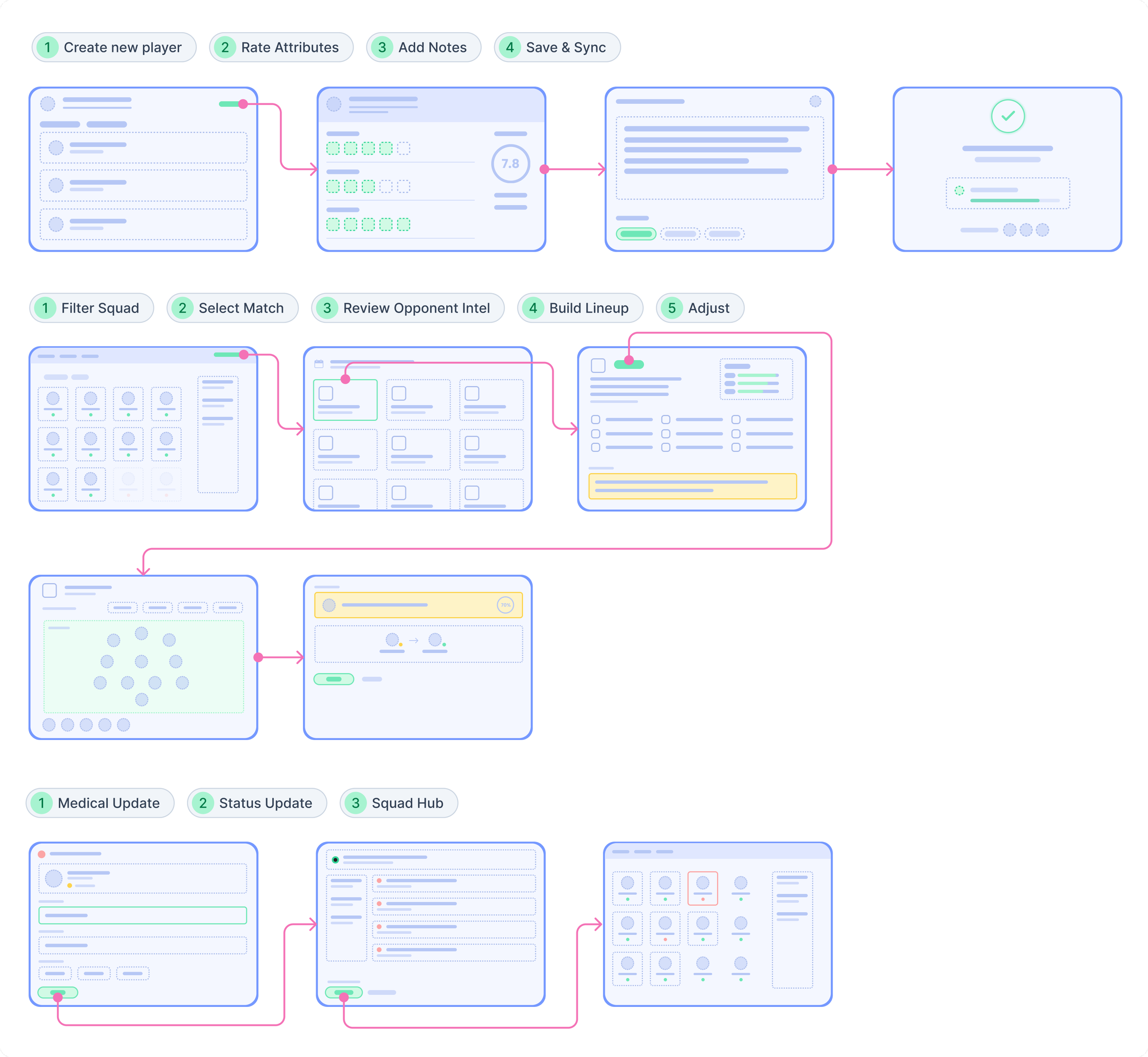
After mapping the team's day-to-day workflows, I sketched early concepts focused on reducing friction in the highest-impact match-week tasks. We moved from paper to wireframes quickly, using the session to identify where tools overlapped and how those actions could be simplified inside ClubSphere.
These insights shaped the information architecture, key user flows, and the Squad Hub as the system's central touchpoint.
Reduce friction in tasks
IMPACT
From fragmented workflows to guided, end-to-end flows
Because ClubSphere is not yet a production tool, I framed impact as prototype-based estimates from walkthroughs rather than live product metrics. The low-fidelity Figma prototypes let Miguel and Steve compare their current workflows with how those same tasks could be completed in ClubSphere.
✅ Scouting a player became a single, continuous flow
Miguel previously had to search spreadsheets, enter ratings manually, write notes in Word, upload files to Drive, and send links to staff. ClubSphere consolidated this into a guided flow: select player → rate attributes → add notes & timestamps → save & sync.
Prototype estimate: 9-11 steps reduced to 4, 3 external tools removed, and faster scouting-to-coach handoff during walkthroughs.
✅ Match preparation shifted from manual assembly to guided flow
Previously, Steve and staff checked availability in spreadsheets, reviewed reports and training metrics, then emailed updates. ClubSphere unified those steps into one match-prep flow: review squad status → analyze performance & fitness → save & sync.
Prototype estimate: 8-10 steps reduced to 4, 4 external tools removed, and faster lineup finalization during pre-match sessions.
✅ Lineup exploration became faster and easier
Previously, Steve and staff used a physical whiteboard or whiteboard app to test formations, redraw changes, and photograph or email the final version. Moving lineup exploration into ClubSphere makes it easier to experiment, revise, and share in one place.
Prototype estimate: 5-7 steps reduced to 2-3, 2-3 manual handoffs removed, and less version confusion during revisions.
✅ Consolidating tools reduced software and coordination costs
The staff relied on Word documents, Excel spreadsheets, and shared OneDrive folders for scouting reports, availability tracking, and notes. Centralizing these workflows reduces parallel tools, repeated file management, and manual coordination.
Potential impact: consolidates 3 common productivity tools, estimates about $99 per staff member per year in software savings, and lowers onboarding overhead by training staff on one system instead of several.
DESIGN SOLUTION
These high-fidelity screens showcase the visual language, interaction patterns, and information hierarchy of ClubSphere. The designs focus on clarity under pressure, using strong visual cues, consistent layouts, and role-aware interactions to help staff quickly assess player status, readiness, and context without unnecessary friction.
Introducing ClubSphere
The Squad Hub serves as the daily command center, providing real-time visibility into player availability, fitness levels, and performance context. Designed for speed, clarity, and low cognitive load for coaches & staff.
Squad Hub
The Player Profile acts as the single source of truth for an individual player, consolidating information contributed by multiple departments into one clear, role-aware view with timeline-style updates.
Player Profile
This screen gives coaches a visual snapshot of squad readiness leading into an upcoming match, combining availability, fitness, and workload into a single high-impact view. It is designed to replace mental math and give coaches an immediate sense of squad health.
Match readiness overview
A detailed post-match analysis screen for individual players, featuring performance metrics, attribute ratings, key moments, and coach notes. Designed for quick review and sharing after matches.
Player match reports
A dedicated evaluation interface for scouts to rate player attributes during observations. Features intuitive rating boxes, real-time overall score calculation, and structured note-taking.
Scout player ratings
RETROSPECTIVE
What this project taught me about designing for constraints
This project helped me better understand how local youth soccer organizations operate under real-time pressure, often while juggling multiple tools and relying on manual coordination.
Designing ClubSphere reinforced the importance of clarity over complexity. The strongest design decisions were not about adding more features, but about reducing friction, surfacing the right information at the right moment, and making everyday decisions easier for the people using the product.